Blog Entry
在Windows下使用Zig编译dll
在Windows下使用Zig编译dll
- Created
- 2023/09/08
- Updated
- 2023/09/08
环境
❯ zig version0.12.0-dev.286+b0d9bb0bbdll
新建项目
mkdir dllcd dllzig init-lib核心代码
// To compile this, you could use this command " zig build-lib -lc -dynamic -fstrip -O ReleaseSmall src/main.zig"
const std = @import("std");const win = std.os.windows;
// Typesconst WINAPI = win.WINAPI;const HINSTANCE = win.HINSTANCE;const DWORD = win.DWORD;const LPVOID = win.LPVOID;const BOOL = win.BOOL;const HWND = win.HWND;const LPCSTR = win.LPCSTR;const UINT = win.UINT;
// fdwReason parameter valuesconst DLL_PROCESS_ATTACH: DWORD = 1;const DLL_THREAD_ATTACH: DWORD = 2;const DLL_THREAD_DETACH: DWORD = 3;const DLL_PROCESS_DETACH: DWORD = 0;
extern "user32" fn MessageBoxA(hWnd: ?HWND, lpText: LPCSTR, lpCaption: LPCSTR, uType: UINT) callconv(WINAPI) i32;
pub export fn _DllMainCRTStartup(hinstDLL: HINSTANCE, fdwReason: DWORD, lpReserved: LPVOID) BOOL {    _ = lpReserved;    _ = hinstDLL;    switch (fdwReason) {        DLL_PROCESS_ATTACH => {            _ = MessageBoxA(null, "Hello World!", "Zig", 0);        },        DLL_THREAD_ATTACH => {},        DLL_THREAD_DETACH => {},        DLL_PROCESS_DETACH => {},        else => {},    }    return 1;}
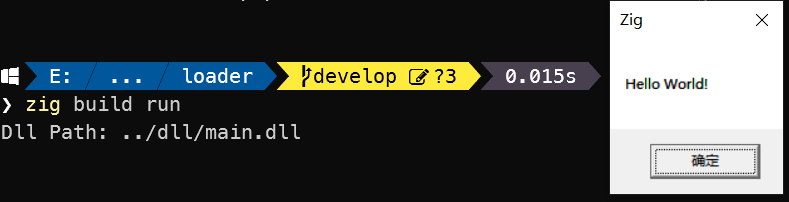
如果Dll被加载,就会弹个框。
编译
zig build-lib -lc -dynamic -fstrip -O ReleaseSmall src/main.zig
❯ ls main*
    目录: E:\xk\Code\xkyss\xkyss.zig\playground\v0.12\dll
Mode                 LastWriteTime         Length Name----                 -------------         ------ -----a----          2023/9/8     10:30          19968 main.dll-a----          2023/9/8     10:30            950 main.dll.obj-a----          2023/9/8     10:30           1146 main.lib
loader
新建项目
mkdir loadercd loaderzig init-exe核心代码
const std = @import("std");
pub fn main() !void {    const dllpath =        // 绝对路径        // \\E:\xk\Code\xkyss\xkyss.zig\playground\v0.12\dll\main.dll        // 相对路径        \\../dll/main.dll    ;    std.debug.print("Dll Path: {s}\n", .{dllpath});
    // 加载dll    _ = try std.DynLib.open(dllpath);}
运行
zig build run