Blog Entry
使用vcpkg
使用vcpkg
- Created
- 2023/12/27
- Updated
- 2024/05/07
资料
安装
官方文档里面说到是要去拉源码并编译:
git clone https://github.com/microsoft/vcpkg.git但是我发现VS2022安装完C++的部分之后,自己就安装了vcpkg,并且在Developer Command Prompt for VS2022中自动配置环境变量,所以使用VS2022是自动支持的。
但是项目属性中如果需要有配置菜单,需要:
vcpkg integrate install其他的按照官方文档来就可以了
清单方式
- 进入工程目录
# 建立vcpkg配置vcpkg new --application
# 添加依赖vcpkg add port fmt- 修改安装目录
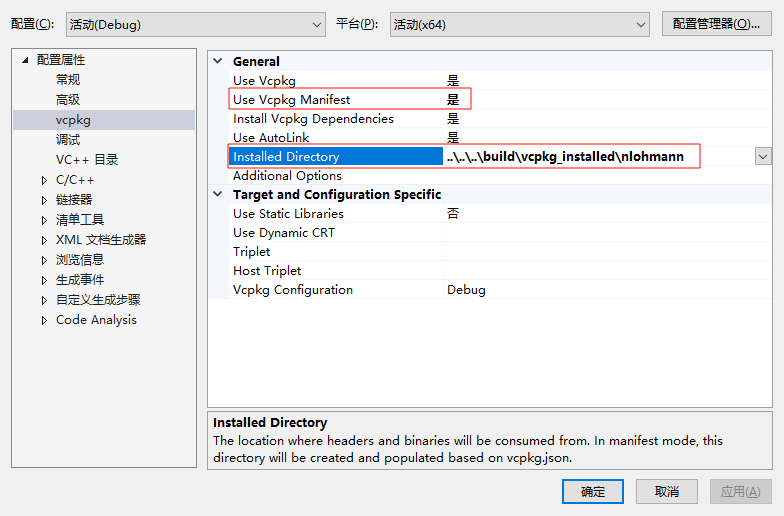
CMake + vcpkg
清单
执行vcpkg new --application之后就会生成清单文件vcpkg.json
编辑文件增加依赖, 例如:
{ "dependencies": [ { "name": "nlohmann-json", "version>=": "3.11.3" } ]}安装
执行vcpkg install,会按照清单文件按照依赖,成功时会有类似以下提示:
The package nlohmann-json provides CMake targets:
find_package(nlohmann_json CONFIG REQUIRED)target_link_libraries(main PRIVATE nlohmann_json::nlohmann_json)
The package nlohmann-json can be configured to not provide implicit conversions via a custom triplet file:
set(nlohmann-json_IMPLICIT_CONVERSIONS OFF)
For more information, see the docs here:
https://json.nlohmann.me/api/macros/json_use_implicit_conversions/速度把其中CMake相关的内容添加到CMakeLists.txt文件里面, 如:
# 将源代码添加到此项目的可执行文件。add_executable (mlcache "mlcache.cpp" "mlcache.h" "Cache.cpp" "Cache.h"  "demo/User.h"  "demo/Config.h")
# 增加的这一段find_package(nlohmann_json CONFIG REQUIRED)target_link_libraries(main PRIVATE nlohmann_json::nlohmann_json)
if (CMAKE_VERSION VERSION_GREATER 3.12)  set_property(TARGET mlcache PROPERTY CXX_STANDARD 11)endif()
这样头文件也能正确找到了
离线安装
%% 2024.08.21 %%